 EdgeNote
Free timesheet templates
Weekly and monthly time sheets for staff, freelancers and contractors. Type the start and finish times, and the Excel versions work out the hours, including breaks and night shifts, and the pay. Free, no sign-up, and nothing about us on your timesheets.
Updated October 2026. Made by the people behind EdgeNote. More in our free templates.
Which one do I need?
- Weekly timesheet: seven days, Monday to Sunday or starting on any day you choose. The most common choice for weekly pay.
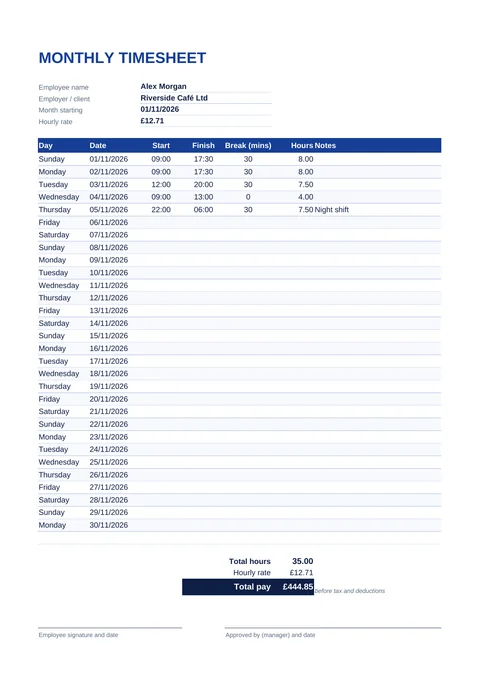
- Monthly timesheet: every day of the month on one page, for monthly pay or invoicing.
- Excel does the sums. The fillable PDF opens in your browser, but you add up the hours yourself. The printable PDF is for filling in by hand on the wall or in the van.
Download your timesheet
Weekly timesheet
How the hours are worked out
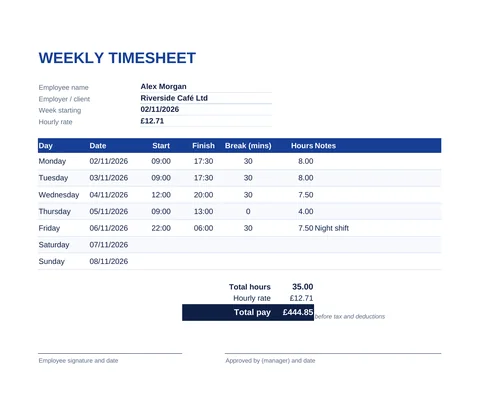
Type times in 24-hour format, such as 09:00 and 17:30, and the unpaid break in minutes. The Excel timesheet takes the break off and shows the hours as a decimal, so 7 hours 30 minutes shows as 7.50. Shifts that end after midnight work too: 22:00 to 06:00 with a 30-minute break comes to 7.50 hours.
| Minutes | As a decimal |
|---|---|
| 15 minutes | 0.25 |
| 30 minutes | 0.50 |
| 45 minutes | 0.75 |
| 20 minutes | 0.33 |
| 10 minutes | 0.17 |
Filling in the PDF by hand? Divide the minutes by 60. For example, 8 hours 45 minutes is 8 + 45 ÷ 60 = 8.75 hours.
UK working time rules to know
- Breaks: workers are entitled to one uninterrupted 20-minute break if they work more than six hours a day. Whether it's paid depends on the employment contract (GOV.UK).
- Rest between shifts: 11 hours between working days, plus 24 hours off each week or 48 hours each fortnight.
- Weekly hours: no more than 48 hours a week on average, normally averaged over 17 weeks, unless the worker chooses to opt out (GOV.UK).
Minimum hourly rates from April 2026 (GOV.UK):
| Age | Hourly rate |
|---|---|
| 21 and over (National Living Wage) | £12.71 |
| 18 to 20 | £10.85 |
| Under 18 | £8.00 |
| Apprentice | £8.00 |
Rates usually change every April. This page is general information, not legal or payroll advice.
Track your hours in EdgeNote
EdgeNote, our notes app for Windows, keeps a timesheet in a panel at the edge of your screen, so it's always one move away while you work. Type the start and finish times and the hours and the amount to bill work themselves out:
- Open EdgeNote and click Templates at the top of the panel.
- Choose the Sheets tab, then Timesheet (A4).
- Fill in each day as you go. Print it or save it as a PDF at the end of the week.
More free templates
Freelancer or contractor? Turn your hours into a bill with our free UK invoice template. Planning shifts ahead? Our printable 2027 calendar shows every UK bank holiday.
Questions
Are these timesheet templates really free?
Yes. Download them, use them for yourself or your staff, and print as many as you need. There's no sign-up, and nothing of ours on the timesheets.
Can the week start on a day other than Monday?
Yes. In the Excel weekly timesheet, type whatever day your week starts on, such as a Sunday or a Wednesday. The days and dates fill in from there.
Does it work for night shifts?
Yes. If the finish time is earlier than the start time, the Excel timesheet treats the shift as running past midnight, so 22:00 to 06:00 counts as 8 hours before the break.
Does total pay include tax?
No. Total pay is the hours multiplied by the hourly rate, before Income Tax, National Insurance, pension or any other deductions.
Can I use it in Google Sheets?
Yes. Upload the Excel file to Google Drive and open it with Google Sheets. The formulas carry on working.
Can I use it to bill a client?
Yes. Put your hourly rate in, and the total pay is what you'd bill. Then copy the hours and total onto our invoice template.