 EdgeNote
Free budget templates
A monthly household budget, a weekly spending budget and a yearly budget planner. Type in what comes in and what goes out, and the Excel versions add it all up and show what's left over. They work in Google Sheets too. Free, no sign-up.
Updated October 2026. Made by the people behind EdgeNote. More in our free templates.
Which one do I need?
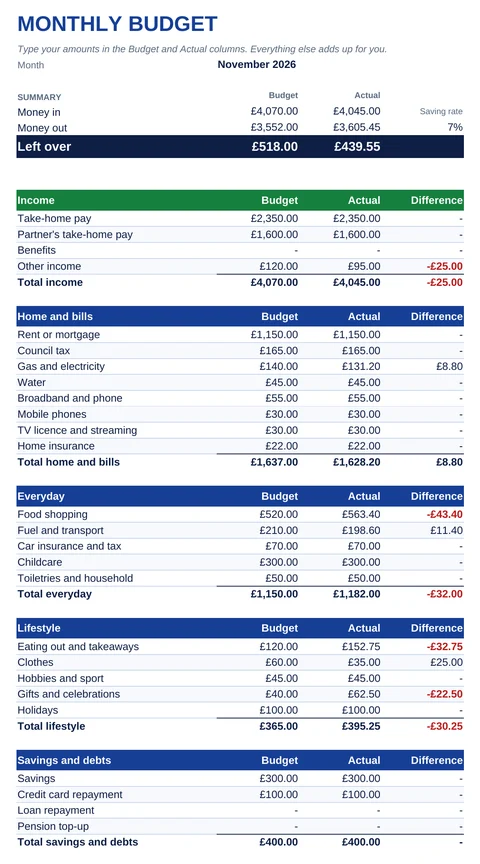
- Monthly budget: the usual household budget. Plan each bill and spending line for the month, then fill in what you actually spent.
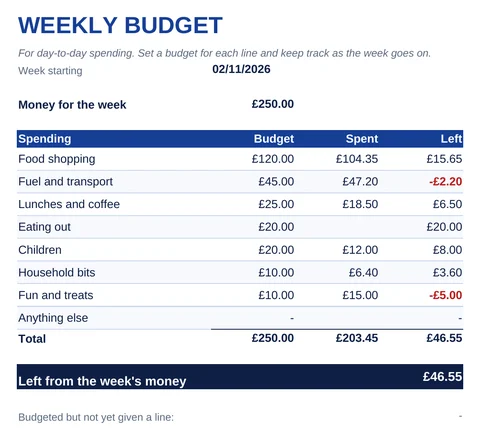
- Weekly budget: for day-to-day spending, such as food, fuel and treats, if you're paid weekly or like to check in every week.
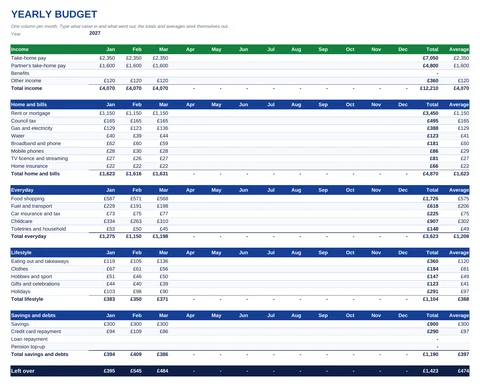
- Yearly budget: one column per month, so you can see the whole year, spot the expensive months and see your averages.
- Excel does the sums, and opens in Google Sheets. The printable PDF is for doing it by hand with a pen and a calculator.
Download your budget template
Monthly budget
Using Google Sheets?
All three spreadsheets work in Google Sheets, with the formulas still working:
- Download the Excel file.
- Go to Google Drive, click New, then File upload, and choose the file.
- Double-click it in Drive, then choose File, Save as Google Sheets.
The examples in each file are made up. Type over them with your own figures, or select them and press Delete to start from blank.
How to make a budget in four steps
- Add up what comes in. Use your take-home pay, after tax and National Insurance, not your salary. Add any benefits and other regular money.
- List your bills. Rent or mortgage, council tax, energy, water, phone, broadband, insurance. Your bank statements and direct debits show most of them.
- Estimate everything else. Food, fuel, eating out, clothes, gifts. Look back over two or three months of statements for a realistic figure.
- Check what's left over. If it's a minus figure, you're planning to spend more than comes in, so look at the lines you can cut first. If there's money left, decide where it goes, such as savings or paying off a card.
The 50/30/20 rule
A popular way to split your take-home pay is roughly 50% on needs, 30% on wants and 20% on savings and paying off debt. It's a starting point rather than a rule: with high rent or energy bills, needs often take more than half.
| On £2,000 a month take-home | Amount |
|---|---|
| 50% needs: housing, bills, food, transport | £1,000 |
| 30% wants: eating out, hobbies, holidays | £600 |
| 20% savings and extra debt payments | £400 |
The monthly template shows your saving rate: the share of your income going into the Savings line. Compare it with the 20% to see how you're doing.
Want help with money worries? MoneyHelper, backed by the government, has a free online budget planner and free, impartial guidance. This page is general information, not financial advice.
Keep your budget in EdgeNote
EdgeNote, our notes app for Windows, keeps a budget spreadsheet in a panel at the edge of your screen, so it's one move away whenever you pay for something. The sums work themselves out, and it all stays on your PC with no account.
- Open EdgeNote and click Templates at the top of the panel.
- Choose the Sheets tab, then Monthly budget (A4) or Expense tracker (A4).
- Type in your figures as you go. Print it or save it as a PDF at the end of the month.
More free templates
Paid by the hour? Our free timesheet template works out your hours and pay. Keeping receipts for things you sell or rent out? Try our receipt templates. And plan the year's bills and paydays on our printable 2027 calendar.
Questions
Are these budget templates really free?
Yes. Download them, change them and print as many as you like. There's no sign-up, and nothing of ours inside the files.
Do they work in Google Sheets?
Yes. Upload the Excel file to Google Drive and save it as a Google Sheet. The totals and formulas carry on working. They also open in Excel on a phone or tablet, and in LibreOffice.
How do I add or rename a line?
Type over any line name, such as changing "Childcare" to "Pets". To add a line, right-click a row in the middle of a section, not the one just above the Total, and choose Insert. The section total then includes the new row; copy the formula from the row above into any working-out columns. Each file has a "How to use" tab with the details.
What does a red figure mean?
On spending lines, red means you spent more than you budgeted. On income, it means less came in than planned. A red "Left over" means more went out than came in.
Should I budget with my salary or my take-home pay?
Take-home pay, the amount that actually reaches your bank account after tax, National Insurance, pension and any student loan.
Which is better, a weekly or a monthly budget?
Most bills are monthly, so a monthly budget is the place to start. Many people then use a weekly budget for food and day-to-day spending, which is easier to keep on track over seven days.