 EdgeNote
Free invoice template (UK)
Simple A4 invoices in pounds, ready to fill in and send. Download the Excel version and the totals and VAT are worked out for you, or use a PDF you can type into or print. Free, no sign-up, and nothing about us on your invoice.
Updated October 2026. Made by the people behind EdgeNote.
Which one do I need?
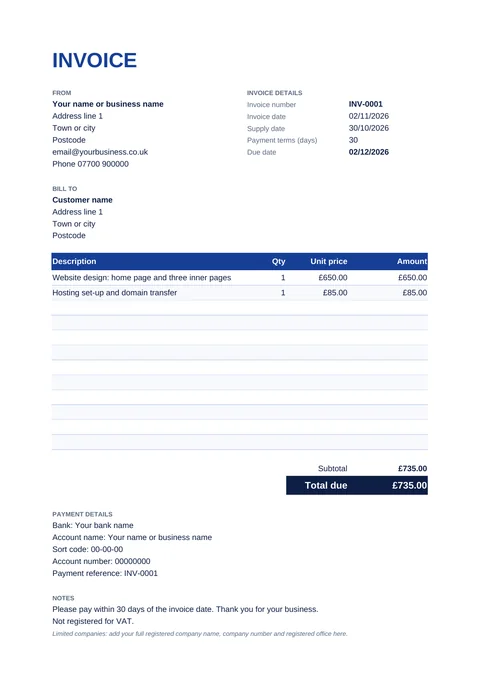
- Not VAT registered (most sole traders and small businesses): use the self-employed invoice. It has no VAT column.
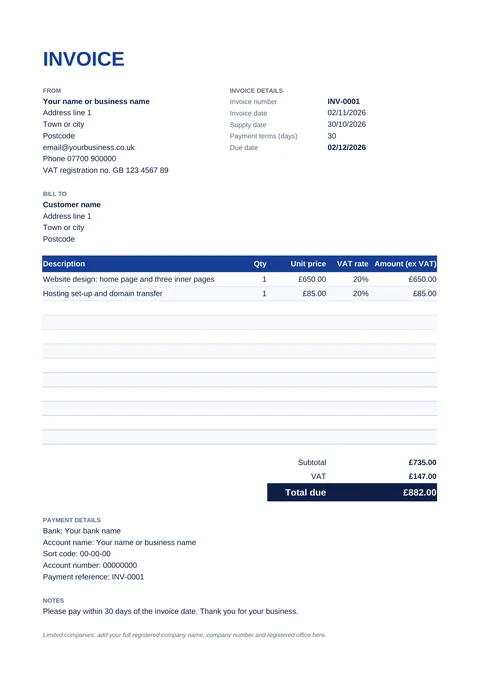
- VAT registered: use the VAT invoice. It shows your VAT number, the VAT rate on each line and the VAT total.
- Excel adds everything up for you. The fillable PDF opens in any browser, so you don't need Excel, but you type the totals in yourself. The printable PDF is for filling in by hand.
Download your invoice template
Self-employed invoice (no VAT)
What a UK invoice must include
According to GOV.UK, every invoice needs:
- a unique invoice number
- your business name, address and contact details
- the name and address of the customer you're invoicing
- a clear description of what you're charging for
- the date the goods or service were provided (the supply date)
- the date of the invoice
- the amounts being charged, and the VAT if you charge it
- the total amount owed
Sole traders must also show their own name as well as any business name they trade under, and, if they use a business name, an address where legal documents can be delivered to them.
Limited companies must show the full company name as it appears on the certificate of incorporation. If you put directors' names on your invoices, you have to list all of them. The templates have a notes box at the bottom for these details.
Do I need to charge VAT?
Only if you're VAT registered. You must register once your taxable turnover for the last 12 months goes over £90,000, the current VAT threshold. Below that, registering is optional, and if you're not registered you can't charge VAT. Use the self-employed template, which has no VAT column.
A full VAT invoice also has to show, according to HMRC's VAT record-keeping guide:
- your VAT registration number
- for each item, the quantity, the unit price, the VAT rate and the amount before VAT
- the total before VAT and the total VAT, in pounds
- an invoice number from a sequence, so each invoice can be told apart
For sales of £250 or less, including VAT, you're allowed to give a simpler VAT invoice. The full VAT template works for any amount.
How to number your invoices
Each invoice needs a number you haven't used before. The easiest way is to count up: INV-0001, INV-0002, INV-0003. Don't skip or reuse numbers. If you send an invoice by mistake, issue a credit note rather than deleting it, so your records still add up.
Payment terms and late payment
The templates say "please pay within 30 days", which you can change. If you haven't agreed a date with your customer, the law treats a payment as late 30 days after the customer gets your invoice or receives the goods or service, whichever is later.
When another business pays you late, you can usually claim interest at 8% plus the Bank of England base rate, unless your contract says otherwise, plus a fixed sum for the cost of chasing it:
| Amount owed | Fixed sum you can claim |
|---|---|
| Up to £999.99 | £40 |
| £1,000 to £9,999.99 | £70 |
| £10,000 or more | £100 |
These rules cover business-to-business sales. This page is general information, not tax or legal advice. If you're unsure, check GOV.UK or ask an accountant.
How to fill them in
Excel
- Open the file and type over the example details: yours, the customer's, the invoice number and dates.
- Delete the two example items and type in your own. The amounts, the subtotal, any VAT and the total due fill themselves in, and so does the due date.
- Go to File → Print and choose A4. Pick "Microsoft Print to PDF" to save a PDF you can email.
Fillable PDF
- Open it in Microsoft Edge, Google Chrome or Adobe Acrobat Reader and click in the boxes to type.
- Work out the amounts and type them in. A PDF can't do the sums for you, so use the Excel version if you'd rather it did.
- Save it under a new name for each invoice, or print it.
Make your invoices in EdgeNote
If you send invoices regularly, EdgeNote, our notes app for Windows, has an invoice maker built in. It asks you a few questions, remembers your business details for next time, and gives you an A4 invoice with the sums done:
- Open EdgeNote and click Templates at the top of the panel.
- Choose the Sheets tab, then Invoice (A4).
- Answer the questions, including whether to add VAT, and your invoice opens as a sheet you can edit.
- Print it or save it as a PDF.
The same tab has a quote / estimate with a box for your customer to sign, a receipt, a timesheet and a monthly budget. Your invoices sit in the panel at the edge of your screen, ready the next time you need one.
More free templates
Pricing a job before you start? Use our free quote template, which has the same layout. Selling gift vouchers? Our gift certificate templates print three to a page. And our printable 2027 calendar marks every UK bank holiday, handy for planning payment dates.
Questions
Are these invoice templates really free?
Yes. Download them, use them for your business and send them to your customers. There's no sign-up, no email address needed, and no logo or link of ours on the invoice.
Which template should I use if I'm self-employed?
If you're a sole trader and not VAT registered, use the self-employed invoice. It has no VAT column, and in the Excel and fillable PDF versions the notes box already says you're not registered for VAT.
Do I have to be a limited company to send an invoice?
No. Sole traders, freelancers and partnerships send invoices too. Limited companies just need to add their full registered company name, which the notes box at the bottom is there for.
Can I open the Excel invoice without Microsoft Excel?
Yes. It works in the free LibreOffice Calc and in Google Sheets (upload it to Google Drive and open it). Or use the fillable PDF, which opens in your web browser.
How do I save the invoice as a PDF to email?
In Excel, go to File, then Print, and choose "Microsoft Print to PDF" as the printer. With the fillable PDF, just save it under a new name once you've typed in it.
What date should go on the invoice?
The invoice date is the day you send it. The supply date is when you delivered the goods or finished the work. If they're the same day, put that date in both boxes.
What can I do if a customer pays late?
Send a polite reminder first. For business customers, you can usually add interest at 8% plus the Bank of England base rate, plus a fixed £40, £70 or £100 depending on the amount owed. See the late payment section above.