 EdgeNote
Free quote template (UK)
Give your customer a clear, professional price before you start. Download the Excel quote and the totals, VAT and expiry date are worked out for you, or use a PDF you can type into or print. There's a builders and trades version too. Free, no sign-up, and nothing about us on your quote.
Updated October 2026. Made by the people behind EdgeNote. More in our free templates.
Which one do I need?
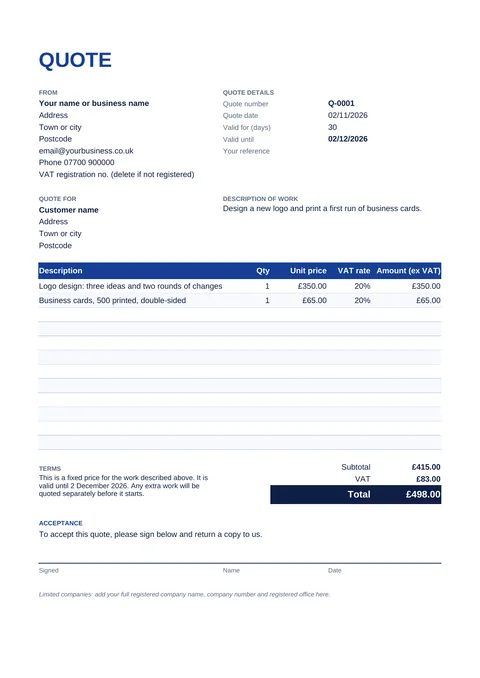
- Quote template: for most jobs and services. List what you'll do and the price of each part, with a VAT rate on each line.
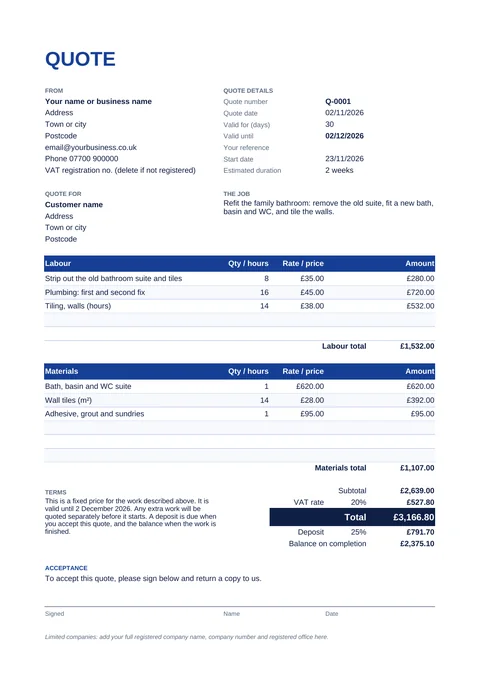
- Builders and trades quote: separate sections for labour and materials, a start date and how long the job will take, and a deposit worked out for you.
- Not VAT registered? Either works: set the VAT rate to 0% and leave out the VAT number.
Download your quote template
Quote template
What to put in a quote
A good quote leaves your customer in no doubt about what they're getting and what it will cost. Include:
- your name or business name, address and contact details
- the customer's name and address
- a quote number and the date
- a clear description of the job, and anything that's not included
- each part of the work with its price, and the VAT if you charge it
- the total
- how long the price is valid for (30 days is common)
- any deposit and when the rest is due
- for building work, when you can start and roughly how long it will take
- a space for the customer to sign to accept
Quote or estimate: what's the difference?
A quote is a fixed price. Once your customer accepts it, they'll expect to pay that amount for the work described, no more. An estimate is your best guess, and the final bill can be different.
If you can't be sure of the price, for example until you've opened up a wall, say so in the description, or price that part separately. Our templates are headed "Quote" and the terms say the price is fixed. Change the heading and terms if you're giving an estimate instead.
Quoting for work in a customer's home
If you and your customer agree the job while you're in their home, consumer law usually gives them 14 days to cancel, starting the day after you agree. According to Trading Standards' Business Companion guide:
- you must tell the customer about their right to cancel and give them a cancellation form
- if you don't, the cancellation period can be extended by up to 12 months, and leaving out this information is a criminal offence
- to start work within the 14 days, the customer has to ask you to in writing, for example by email. If they then cancel, they pay for the work done so far
This is general information, not legal advice. If you work in customers' homes, read the full guide or ask your local Trading Standards.
When the customer says yes
Keep the signed quote, do the work, then send an invoice using the same prices. Our free UK invoice template has the same layout, so you can copy the lines straight across. If you took a deposit, add it to the invoice as a line with a minus amount so it comes off the total.
How to fill them in
Excel
- Type over the example details: yours, the customer's, the quote number and the job description.
- Delete the example lines and add your own. Amounts, totals, VAT and the "valid until" date fill themselves in. On the builders quote, the deposit and balance do too.
- Go to File → Print, choose A4 and pick "Microsoft Print to PDF" to save a PDF you can email.
Fillable PDF
- Open it in Microsoft Edge, Google Chrome or Adobe Acrobat Reader and click in the boxes to type.
- Work out the totals and type them in. A PDF can't do the sums for you; the Excel version can.
- Save it under a new name for each quote.
Make your quotes in EdgeNote
EdgeNote, our notes app for Windows, has a quote maker built in. It asks a few questions, remembers your business details, and gives you an A4 quote with the sums done and a box for your customer to sign:
- Open EdgeNote and click Templates at the top of the panel.
- Choose the Sheets tab, then Quote / estimate (A4).
- Answer the questions, including the valid-until date and whether to add VAT.
- Print it or save it as a PDF. When the job's done, make the invoice from the same tab.
More free templates
Once the work's done, send an invoice with our free UK invoice template. Planning jobs ahead? Our printable 2027 calendar shows every UK bank holiday.
Questions
Are these quote templates really free?
Yes. Download them, use them for your business and send them to your customers. There's no sign-up, and nothing of ours on the quote.
How long should a quote be valid for?
It's up to you. 30 days is common, and shorter makes sense if your material prices change often. The Excel templates work out the end date from the number of days you type in.
Can I ask for a deposit?
Yes, if your customer agrees to it. Deposits are common for building work and anything where you buy materials up front. The builders quote works out the deposit and the balance from the percentage you choose.
I'm not VAT registered. Can I still use these?
Yes. Set the VAT rate to 0% and delete the VAT number line. You must not charge VAT unless you're registered.
Is a quote legally binding?
Once your customer accepts a quote, it generally forms the agreement between you, so you'll be expected to do the work described for the price quoted. That's why it's worth being clear about what's included and what isn't.
Can I open the Excel quote without Microsoft Excel?
Yes. It works in the free LibreOffice Calc and in Google Sheets. Or use the fillable PDF, which opens in your web browser.