 EdgeNote
Free rota templates
A weekly staff rota, a 4-week shift rota and a cleaning rota for the house or flat share. The Excel versions count the hours, the staff on each day and the cost, and the cleaning rota can share out the jobs for you. They work in Google Sheets too. Free, no sign-up.
Updated October 2026. Made by the people behind EdgeNote. More in our free templates.
Which one do I need?
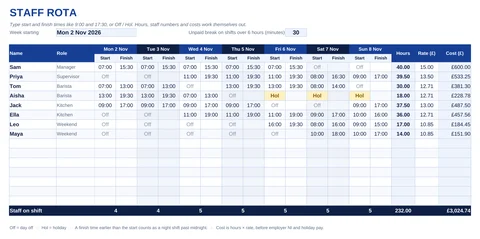
- Weekly staff rota: start and finish times for each person, Monday to Sunday. Works out each person's hours after breaks, how many staff are on each day, and the wage cost.
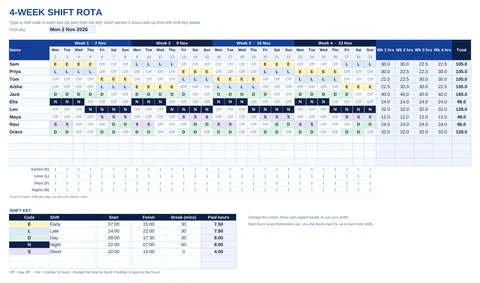
- 4-week shift rota: for earlies, lates, days and nights. Type a letter such as E or N in each box and everyone's hours add up from a shift key you set once.
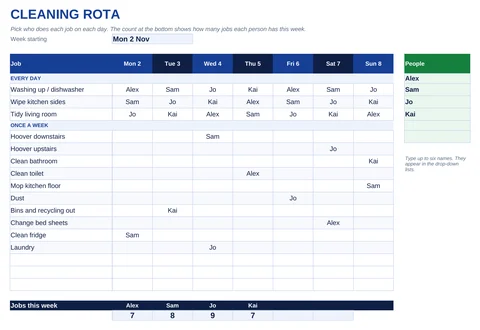
- Cleaning rota: who does which job on which day, for a family or a flat share. A second tab rotates the jobs every week, so everyone takes a turn.
Staff rota templates
Weekly staff rota
Cleaning rota templates
Weekly cleaning rota
Rotating cleaning rota
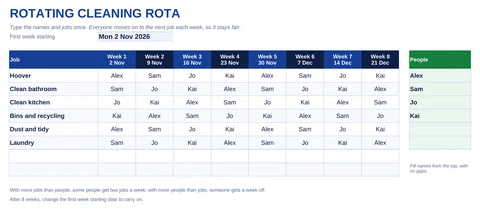
Type the names and the jobs once, and the rota fills in eight weeks, moving everyone along each week. It's the second tab of the Excel cleaning rota.
All the Excel files open in Google Sheets: upload the file to Google Drive, open it, then choose File, Save as Google Sheets. The names and times in each file are made up, so type over them with your own.
How to do a staff rota
- Work out the cover you need. How many people for each part of each day? Busy times, opening and closing usually need more.
- Collect availability first. Ask for holiday requests and days people can't work before you start, so you aren't rewriting it later.
- Fill the hardest shifts first. Weekends, nights and closing shifts, then build the rest around them.
- Check hours and rest. Look at each person's total hours and the gaps between shifts (see the rules below).
- Share it early and keep the same format. Staff plan their lives around the rota. Put it up in the same place each week, on the same day.
UK rules to check when you write a rota
From GOV.UK's guide to rest breaks and maximum weekly hours:
| Rule | Adults (18 and over) |
|---|---|
| Break during the day | 20 minutes when working more than 6 hours |
| Rest between working days | 11 hours in a row |
| Weekly rest | 24 hours each week, or 48 hours each fortnight |
| Average weekly hours | No more than 48, normally averaged over 17 weeks, unless the worker opts out |
Workers under 18 have stricter rules: a 30-minute break when working more than 4.5 hours, 12 hours' rest between working days and 48 hours off each week. They usually can't work more than 8 hours a day or 40 hours a week.
Some jobs have different rules, and contracts can give more. This page is general information, not legal advice.
Making a cleaning rota that sticks
- Split daily and weekly jobs. Washing up and wiping the sides happen every day; the bathroom and hoovering once a week. The template has a section for each.
- Rotate the jobs nobody wants. The rotating tab moves everyone on each week, so the bathroom isn't always the same person's job.
- Check it's fair. "Jobs this week" counts each person's jobs. Bigger jobs can count for more: give someone fewer jobs if theirs take longer.
- Put it where everyone sees it. Print the tick chart for the fridge, or share the file in the family or flat group chat.
Keep this week's rota on your screen with EdgeNote
EdgeNote, our notes app for Windows, keeps notes, checklists and spreadsheets in a panel at the edge of your screen. Push your mouse to the edge and they slide in over whatever you're doing.
- Keep this week's rota in a spreadsheet note, and pop it out onto the desktop, pinned on top of other windows.
- Turn the cleaning jobs into a checklist you tick off as they're done.
- Set a reminder for jobs like putting the bins out.
More free templates
Pay staff by the hour? Our free timesheet template turns the hours worked into pay. Planning holidays around the rota? Our printable 2027 calendar shows every UK bank holiday. And for the household, try our budget templates.
Questions
Are these rota templates really free?
Yes. Download them, change them and print as many as you like, for your own business or home. There's no sign-up, and nothing of ours inside the files.
Do they work in Google Sheets?
Yes. Upload the Excel file to Google Drive and save it as a Google Sheet. The formulas and drop-down lists carry on working, and you can share the sheet with your team.
Can the rota start on a day other than Monday?
Yes. Type any date in "Week starting" or "First day", such as a Sunday, and the days and dates across the top follow on from it.
Does the staff rota handle night shifts?
Yes. If the finish time is earlier than the start time, such as 22:00 to 06:00, the rota counts the shift as running past midnight.
How are breaks taken off?
In the weekly staff rota, set the unpaid break in minutes at the top. It's taken off any shift longer than 6 hours. Set it to 0 if your breaks are paid. In the 4-week rota, each shift in the key has its own break.
Can I add more staff or more shifts?
The weekly rota has room for 15 people and the 4-week rota for 14. To add more, insert a row in the middle of the list and copy the hours formula down from the row above. The 4-week key has two spare rows for your own shifts.
Does the cost include employer National Insurance?
No. Cost is the hours multiplied by each person's hourly rate, before employer National Insurance, pension and holiday pay.